
And this is how fast things are moving in the tech space specifically in the genAI realm.
You can read all about this tool which is entirely open source and on a MIT license – although I would prefer it to be on GPLv3.
It is a framework that you can engage with using any chat platform – mastodon, signal, telegram etc, between you and this tool to have work on your behalf on things that matter to you.
In many ways, these are steps in the direction of Personal AI much like what Kwaai.ai is also doing – and yes, I have set up a kwaainet node in Singapore.
Open Claw does open up really challenging security and privacy concerns and is, for the moment, to be deployed very, very carefully without giving it credentials to your critical data – email passwords etc. You’ve been warned.
I have this running on a Fedora 43 VM (which is itself on a Fedora 43 host) and with all of the models kept locally served via ollama running on a few other systems.
All of my systems are 2nd-hand small form factor systems. The ones I have are two Dell Optiplex and two Lenovo ThinkCentre systems. They have 64GB RAM (the maximum possible) and 1TB storage each. None of them have any GPUs on board and for that I’ve the ONEXGPU external egpu that connects to one of the Dells via a PCI-E <-> Oculink cable.
Not having a GPU does make some of the inference work needed to be done challenging, but this is the tradeoff I am willing to make so that I can learn and understand the issues. Thus far, with the egpu in the mix, I can direct long thread inference to the system that has the egpu connected and thus far, it has worked well enough for my uses cases.
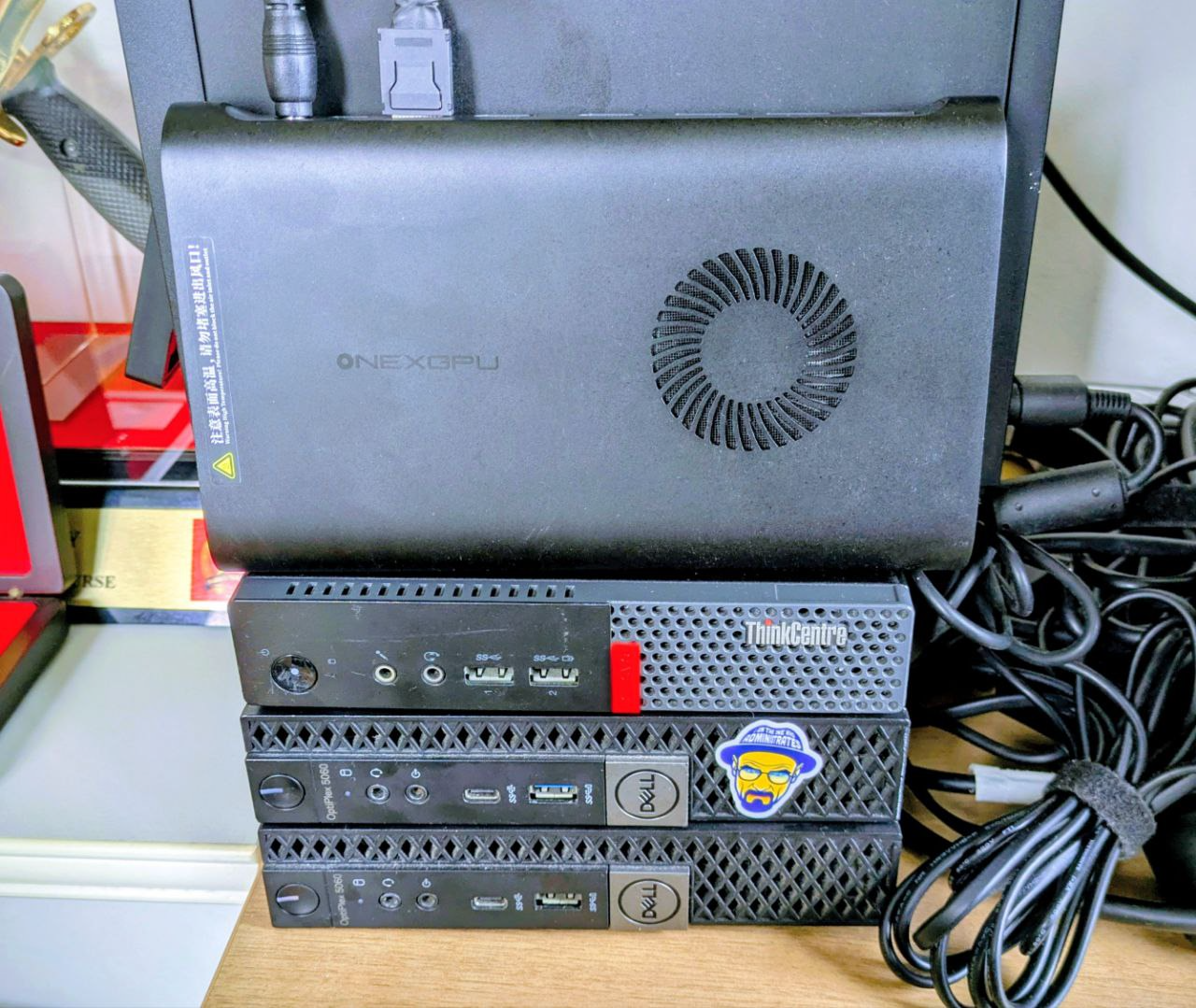
My primary objective in setting these systems up is to ensure that the average person who is currently being firehosed with AI-this and AI-that can get an understanding that such systems are not esoteric and that 100% open source tools and services are able to deliver value.
As noted above, these systems run Fedora 43 and have all of the open source and open weights models installed and served out via ollama, including embedded models (for RAGs).
Services currently available are open-notebook.ai (a notebooklm-like system), Jan.ai and shortly, openclaw – after I shutdown one of the VMs running moltbot.
For completeness, the three SFFs are Bt Gombak, Bt Timah and Bt Batok (from bottom to top) and they are named after the three hills I can see out of the window.

These three systems, plus the egpu and loads of storage via some NASes gives me opportunity to test out all of the various open source tools for AI.
There are many other services that I’ve got running on a couple of other SFFs as well because self-hosted is the best way to keep your contents off the cloud providers and also offers you a wonderful learning environment running real systems with real use cases.
Services like self-hosted Jitsi and Nextcloud.com are just winners out of the box.
Of course all of these systems are reachable from the public Internet and that’s where the trusty Wireguard comes into play. I’ve got it running via PiVPN-PiHole combo – not running on a Raspberry Pi, but in a VM.
 life one-dot-two degree north, one-o-three-dot-eight degrees east
[…] (from Jurassic Park) might need to be updated to include non-life. BTW, the openclaw agents on my system are not on moltbook – because I did not enable it. Unlikely that I […]
[…] he created, as a solo developer, was called “clawd.bot”. Here’s my post on the move from clawd.bot to finally being called openclaw.ai and how I’ve been […]